TikTok Video Downloader Without Watermark: Complete 2026 Guide
 Sarah Cherry
 TikTok has become the dominant short-form video platform, with millions of users creating and sharing content daily. But there's a frustration many face: every video you download through the app comes with a prominent watermark displaying the creator's username and the TikTok logo. Whether you're a content creator looking to repurpose your own videos, a marketer building compilations, or simply someone who wants clean videos for personal use, finding a reliable TikTok video downloader without the watermark has become essential.
The watermark itself isn't just a minor annoyance. It can interfere with professional presentations, diminish the quality of video edits, and make content look cluttered when shared across other platforms. While TikTok includes this branding deliberately to promote their platform and protect creators, there are legitimate reasons to download videos without these marks—especially when you have permission or you're downloading your own content.
Why People Search for Watermark-Free Downloads
The demand for TikTok video downloaders without watermarks stems from several practical needs. Content creators often want to showcase their portfolio without platform branding. Businesses need clean footage for advertisements and promotional materials. Educators might want to incorporate trending videos into presentations without distracting logos.
There's also the matter of archiving. Some users simply want to preserve videos they love before they potentially disappear from the platform. Musicians and artists frequently download their own content to share across multiple social networks, and the TikTok watermark can appear unprofessional when posted to LinkedIn or embedded in a website.
How Watermark Removal Actually Works
Most TikTok video downloaders without watermarks don't actually "remove" anything through editing. Instead, they access the original video file before TikTok applies its overlay. When someone uploads a video to TikTok, the platform stores both the original file and a version with the watermark applied. Third-party downloaders exploit this by requesting the clean version directly from TikTok's servers.
This technical approach means the video quality remains pristine. There's no degradation from processing or re-encoding. You're getting the exact same file the creator uploaded, just without the branded overlay that TikTok adds for public downloads.
Top Methods to Download Videos Without Watermarks
Several approaches work reliably in 2026, each with distinct advantages depending on your device and how frequently you download videos.
Web-Based Downloaders
Online tools remain the most popular choice because they require no installation. You simply copy the TikTok video link, paste it into the downloader's website, and receive a clean video file within seconds. These services work across all devices—phones, tablets, computers—and across operating systems.
The process is straightforward. Open TikTok, find the video you want, tap the share button, and select "Copy Link." Then navigate to a downloader website, paste the URL, and click download. The site processes the request and provides a download button for the watermark-free version.
Mobile Applications
Dedicated apps offer convenience for frequent users. Available on both iOS and Android, these applications integrate more smoothly into your workflow. Many include built-in browsers that let you browse TikTok directly within the app, selecting videos to download without switching between applications.
Some apps go further by offering batch downloading, letting you save multiple videos at once. Others include basic editing tools, allowing you to trim clips or adjust formats before saving. The trade-off is that apps consume storage space and may include advertisements or require subscriptions for premium features.
Browser Extensions
For desktop users, browser extensions provide the fastest experience. Once installed in Chrome, Firefox, or Edge, these add-ons place a download button directly on TikTok's website. You don't need to copy links or visit separate sites—just click the added button while viewing any video.
Extensions update automatically and typically work without interrupting your browsing. They're particularly useful for researchers or content curators who download numerous videos regularly. The main limitation is that they only function on desktop computers, not mobile devices.
Selecting a Reliable Downloader
Not all downloaders are created equal. The internet is crowded with tools that promise watermark-free downloads but deliver poor results, intrusive ads, or worse—security risks.
Speed matters significantly. Quality downloaders process videos within five to ten seconds. If a service takes minutes or seems to stall, it's either poorly designed or potentially problematic. Legitimate tools don't need extended processing time for this straightforward task.
Watch for red flags. Excessive pop-up advertisements, requests for personal information, or demands to install unknown software all signal trouble. Reputable downloaders might show some ads to fund their free service, but these should be clearly marked and non-intrusive. Never download executables or apps from unverified sources.
Video quality is another critical factor. The best downloaders preserve the original resolution and audio quality. Some inferior services re-encode videos, reducing clarity and introducing compression artifacts. Always test with a few downloads before committing to any particular tool, especially if you need professional-quality results.
Legal and Ethical Considerations
Downloading TikTok videos without watermarks exists in a grey area that requires thoughtful consideration. The technology itself is legal—you're simply accessing content that's publicly available. But copyright law still applies to the videos themselves.
If you created the video, downloading it without the watermark is unquestionably your right. You own the content and can use it however you wish. Many creators regularly download their own videos to maintain clean copies for their portfolios or to share on other platforms without cross-promotion.
Downloading someone else's content requires permission. Even if you can technically remove the watermark, the video belongs to its creator. Using it without authorization violates copyright, regardless of whether a watermark is present. This applies even to videos that seem trivial or informal—the creator holds the rights.
Fair use provides limited exceptions for commentary, criticism, education, and parody. But these exemptions are narrow and situation-specific. When in doubt, reach out to the creator and ask. Most are happy to grant permission if you explain your intended use, and some may even provide you with the original file directly.
Privacy and Security When Using Downloaders
Using third-party downloaders means sharing video URLs with external services. While this seems innocuous, it does create a record of what you're downloading and when. Reputable services don't store this information, but not all can be trusted.
Stick to established downloaders with transparent privacy policies. Avoid services that require account creation unless you've verified their legitimacy. Never provide payment information to free downloaders—legitimate free services don't need your credit card "for verification."
Browser security extensions can help. Tools like HTTPS Everywhere ensure your connection to downloader websites is encrypted. Ad blockers reduce exposure to malicious advertisements that sometimes appear on these sites. Keep your antivirus software active and updated, and be cautious about clicking download buttons—sometimes ads disguise themselves as the actual download link.
Alternative Approaches Worth Considering
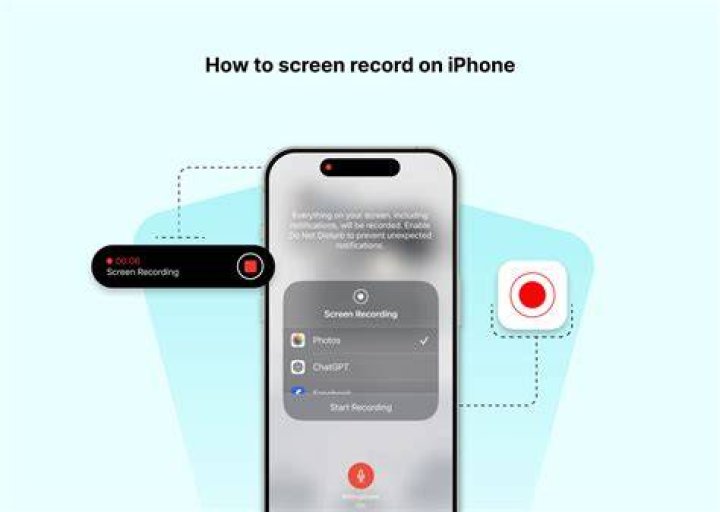
Screen recording offers a watermark-free solution that works universally. Both iOS and Android include built-in screen recorders, as do Windows and macOS. Simply play the video in full screen and record it. The watermark will be absent since you're capturing the video during playback, before TikTok applies its overlay.
The downside is quality loss. Screen recordings capture exactly what displays on your screen, which may be lower resolution than the original file. Audio can also suffer, especially if your system is processing other sounds simultaneously. But for casual use, this method works without relying on third-party tools.
Some users employ developer tools built into web browsers. By inspecting the page elements while a video plays on TikTok's website, technically savvy users can locate the direct video file URL and download it manually. This requires comfort with browser developer consoles and a bit of patience, but it works without any additional software.
Common Issues and Solutions
Even reliable downloaders occasionally hiccup. Videos might fail to process, download with watermarks despite promises, or come through in unexpected formats.
When a downloader fails, the video link itself is often the culprit. Make sure you're copying the full URL, including the video ID. Some users accidentally copy partial links or include extra characters, which confuses the downloader's parser. Try copying the link again, or use TikTok's native share feature rather than copying from your browser's address bar.
Private or age-restricted videos won't download through most services. Downloaders can only access publicly available content. If a creator has restricted their video, you'll need to view it through official channels and, if necessary, request the file directly from them.
Occasional glitches occur when TikTok updates its systems. Downloaders must adapt to changes in how TikTok structures its URLs and serves video files. If your preferred tool suddenly stops working, check for updates or try an alternative temporarily. Most downloader services recover within hours or days as developers adjust to platform changes.
Frequently Asked Questions
Is it legal to download TikTok videos without watermarks?
Downloading videos for personal use falls into a legal grey area. The act of downloading itself isn't illegal, but copyright law protects the content. You can legally download your own videos or those where you have explicit permission. Using downloaded content without permission—especially for commercial purposes—violates copyright regardless of watermark status. Always obtain consent from creators before using their work.
Do these downloaders work on both mobile and desktop?
Most web-based downloaders function on any device with a browser, including smartphones, tablets, and computers. Mobile apps are platform-specific, requiring either iOS or Android. Browser extensions only work on desktop computers. Your choice depends on where you browse TikTok most frequently and how often you download videos. Mobile apps offer the smoothest experience for phone users, while extensions excel for desktop workflows.
Why do some videos still have watermarks after downloading?
This usually indicates the downloader isn't accessing the clean video file properly. Try a different service, as some are more reliable than others. Occasionally, TikTok changes how it stores videos, temporarily breaking some downloaders until developers update their tools. If multiple downloaders fail, the video itself might have the watermark baked into the original file—some creators add watermarks before uploading to TikTok, which means they're part of the video itself rather than an overlay TikTok adds.
Making the Right Choice for Your Needs
Selecting the right TikTok video downloader without watermarks depends on your specific situation. Casual users who occasionally save a video or two will find web-based tools perfectly adequate. The lack of installation and universal compatibility make them accessible and convenient.
Content creators managing multiple accounts or regularly archiving content benefit from dedicated apps or browser extensions. The efficiency gains from integrated tools justify the minor setup effort. Batch downloading features alone can save hours for anyone working with large quantities of videos.
Regardless of which tool you choose, prioritize reliability and safety. A downloader that works quickly, preserves quality, and respects your privacy is worth using consistently. Test a few options to find one that fits your workflow, then stick with it rather than constantly switching between services.
Remember that technology serves us best when used responsibly. Download videos ethically, respect creators' rights, and always consider whether you truly need to remove the watermark. Sometimes leaving it intact is the right choice—it credits the creator and maintains transparency about the content's origin. But when you have legitimate reasons to download clean versions, these tools provide that capability reliably and efficiently.