Screen Shadow in Corner: Causes, Fixes, and Prevention Guide
 Emma Johnson
 A dark shadow appearing in the corner of your screen can be frustrating and distracting. This common display issue affects laptops, monitors, tablets, and smartphones alike, turning what should be a crisp viewing experience into something noticeably imperfect. Whether it's a faint discoloration or a pronounced dark spot, that corner shadow often signals an underlying problem that won't resolve itself.
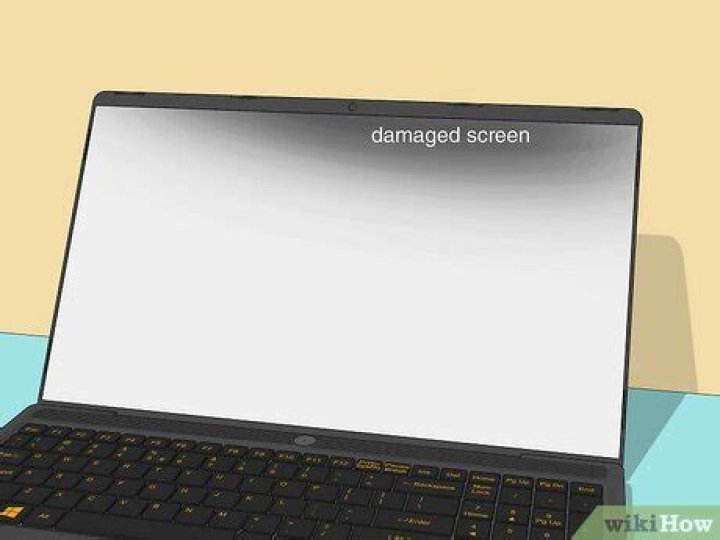
Screen shadows typically manifest as darker patches, usually gray or black, concentrated in one or more corners of your display. They might appear suddenly after dropping your device, or gradually develop over time. Understanding what causes these shadows is the first step toward fixing them—and preventing future occurrences.
What Causes Corner Shadows on Screens
The shadowy corner on your display rarely happens by chance. Physical pressure tops the list of culprits. When something presses against the LCD panel—whether from a tight laptop bag, stacked books, or even an overly aggressive cleaning session—it can damage the delicate liquid crystal layer. This pressure creates dead zones where light can't pass through properly.
Backlight bleeding represents another frequent cause. Modern screens rely on LED backlights positioned around the panel's edges. When these lights aren't perfectly diffused, or when the screen assembly isn't seated correctly, light escapes unevenly. Corners become natural weak points where this bleeding becomes visible, especially against dark backgrounds.
Temperature fluctuations also play a role. LCD panels expand and contract with heat and cold. Extreme temperature swings can warp the display ever so slightly, creating gaps between layers. These gaps interrupt the light path, manifesting as shadows or dark patches in corner regions.
Manufacturing defects occasionally slip through quality control. Some screens leave the factory with imperfect adhesive bonds or misaligned components. These flaws might not appear immediately but worsen as you use the device daily.
Identifying Your Specific Shadow Problem
Not all corner shadows behave identically. A pressure mark typically stays consistent regardless of what's displayed on screen. You'll see it whether you're viewing a white document or a dark video. These marks often have irregular edges and might show slight color distortion beyond just darkness.
Backlight bleed changes with screen brightness. Crank up the brightness and the shadow intensifies. Lower it and the effect diminishes. This type usually appears grayish rather than pure black and spreads slightly beyond the corner in a cloudy pattern.
Dead pixels create precise, unchanging spots. Unlike diffuse shadows, these appear as tiny black or colored dots. A cluster of dead pixels in a corner might initially look like a shadow but reveals its pixel-level nature upon close inspection.
Dust or debris trapped between screen layers produces shadows that might shift slightly when you flex the display or apply gentle pressure. These foreign particles block light transmission, creating localized dark areas that can resemble intentional shadowing.
DIY Solutions Worth Trying
Before spending money on repairs, several home remedies might resolve minor shadow issues. Start with a screen calibration. Both Windows and macOS offer built-in calibration tools that adjust brightness, contrast, and gamma. Navigate to your display settings and run the calibration wizard. This won't fix physical damage but can minimize the appearance of minor bleeding or discoloration.
The pressure release technique works for recent pressure damage. Power down your device completely. Using a soft microfiber cloth, apply very gentle, circular pressure around the shadowed area—emphasis on gentle. You're attempting to redistribute the liquid crystals, not create more damage. Work slowly for about 30 seconds, then power on and check for improvement.
Adjusting your backlight settings provides immediate relief for backlight bleeding. Reduce overall brightness to a comfortable level rather than maxing it out. Many devices also offer local dimming features that can minimize corner bleeding by intelligently adjusting backlight zones.
For external monitors, reseat all connections. Unplug the display cable, inspect for bent pins or debris, then firmly reconnect it. Sometimes poor connections cause signal issues that manifest as display abnormalities including shadows.
Temperature normalization helps if temperature caused the problem. Let your device reach room temperature naturally if it's been in extreme cold or heat. Never use external heat sources or refrigeration to speed this process—rapid temperature changes cause worse damage than the original problem.
When Professional Repair Becomes Necessary
Certain shadow problems require expert intervention. If the shadow appeared immediately after dropping your device, internal damage likely occurred. The LCD panel itself might have cracked layers invisible to the naked eye, or internal connections may have loosened.
Expanding shadows signal progressive damage. What starts as a small corner discoloration that grows week by week indicates worsening internal issues. This progression won't stop on its own and typically accelerates over time.
Professional repair shops can replace damaged LCD panels, reseat backlight assemblies, or fix connection problems that cause shadowing. Expect to pay between $100 and $400 for laptop repairs, depending on screen size and model. Desktop monitors might cost less since they're generally easier to service.
Check warranty status before paying out of pocket. Manufacturing defects typically fall under warranty coverage, especially if the shadow appeared without physical trauma. Document the issue with photos and contact the manufacturer's support team. Many will replace defective screens free of charge during the warranty period.
Prevention Strategies That Actually Work
Protecting your screen from corner shadows starts with proper storage and handling. Never place heavy objects on closed laptops. That textbook or water bottle pressing down might seem harmless but can create pressure points that damage the display over time.
Use appropriate carrying cases with dedicated laptop compartments. The cushioning protects against impact while maintaining proper spacing around the device. Avoid cramming your laptop into overstuffed bags where it compresses against other items.
Clean screens correctly using microfiber cloths and screen-safe cleaners. Spray cleaner onto the cloth, never directly onto the screen. Excessive liquid can seep into edges and damage internal components. Apply only gentle pressure during cleaning—scrubbing hard against stubborn marks risks creating the very shadows you're trying to prevent.
Maintain stable operating temperatures. Don't leave devices in hot cars or freezing environments. LCD panels contain liquid crystals that become unstable at temperature extremes. Even a few hours in harsh conditions can cause permanent damage.
Regular inspections catch problems early. Once monthly, display a pure white image fullscreen and examine each corner carefully in a dim room. Early detection of backlight bleeding or developing shadows gives you time to address issues before they worsen.
Understanding Long-Term Display Health
Screen longevity depends heavily on usage patterns. Displays showing static images for hours daily—like point-of-sale terminals or monitoring stations—develop image retention and uneven wear. The corners, already vulnerable, suffer accelerated degradation.
Brightness levels impact lifespan significantly. Running your display at maximum brightness constantly stresses the backlight system. This stress manifests first in corners where light dispersion already faces challenges. Setting brightness to 70-80% extends both backlight life and overall display health.
Screen technology matters. IPS panels generally show less corner bleeding than TN panels but cost more. OLED displays eliminate backlight bleeding entirely since each pixel produces its own light, though they bring different longevity concerns like burn-in.
The five-year mark represents when most displays begin showing age-related issues. Corner shadows, slight color shifts, and backlight dimming become increasingly common. This doesn't necessarily mean replacement is urgent, but awareness helps you plan for eventual upgrades.
Frequently Asked Questions
Can corner shadows spread to other parts of the screen?
Yes, corner shadows often expand if left unaddressed. Pressure damage can worsen as weakened areas become more susceptible to additional stress. Backlight bleeding may also spread as adhesive bonds continue deteriorating. Once you notice a corner shadow, monitor it regularly. If it grows, seek repair sooner rather than later to prevent it from affecting larger portions of your display.
Is it safe to continue using a screen with corner shadows?
Generally, yes. Corner shadows are primarily cosmetic issues that don't pose safety risks. The shadow won't damage other device components or cause data loss. However, if the shadow resulted from significant physical damage—like a cracked internal layer—continued use might worsen the problem. Assess whether the shadow impairs your ability to work effectively. Minor shadows are tolerable; significant dark areas that obscure content warrant prompt attention.
Do screen protectors prevent or reduce corner shadows?
Screen protectors offer minimal protection against corner shadows since most causes originate beneath the display surface. However, they do guard against scratches and minor impacts that could potentially lead to damage. Tempered glass protectors provide some shock absorption during drops, which indirectly reduces shadow risk. Don't rely on screen protectors as your primary defense, but they're worthwhile as part of comprehensive device protection.
Making Informed Decisions About Screen Issues
Corner shadows frustrate users because they're visible yet often subtle enough to dismiss—at least initially. That dismissal frequently leads to regret when small shadows become large ones, or when warranty periods expire before you take action.
The economics of repair matter. For budget devices, replacement screens sometimes cost nearly as much as new units. Premium laptops and monitors justify repair investments more easily. Calculate the repair cost as a percentage of your device's current value. If repairs exceed 50% of replacement cost, consider upgrading instead.
Some users learn to ignore minor corner shadows, especially on older devices nearing replacement anyway. This approach works if the shadow doesn't interfere with daily tasks. Photographers, designers, and video editors need pristine displays and can't accept even minor discoloration. Assess your specific needs honestly.
Technology marches forward rapidly. Today's mid-range displays often surpass premium screens from just five years ago. If your shadowed screen belongs to an older device, an upgrade might deliver broader benefits beyond shadow elimination—better color accuracy, higher resolution, improved refresh rates, and modern connectivity options.
Screen shadows in corners stem from identifiable causes with varying solutions. Physical care, proper environmental conditions, and prompt attention to developing issues keep displays healthy longer. When shadows do appear, quick assessment and appropriate response—whether DIY fixes or professional repair—minimize both inconvenience and cost.
