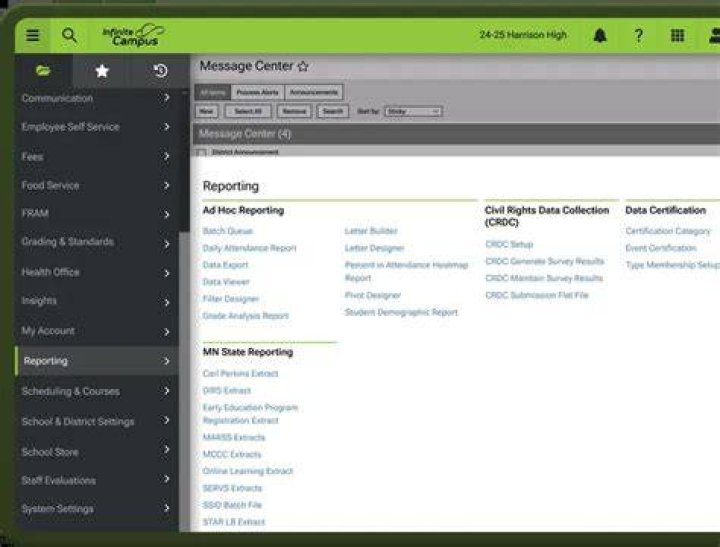
How to Check Your Regents Score on Infinite Campus: Complete Guide
 David Osborn
 Students across New York State rely on Infinite Campus to access their academic records, and checking Regents exam scores through this platform has become a routine part of the post-exam experience. The process is straightforward once you know where to look, but navigating the system for the first time can feel confusing. Your Regents scores typically appear in Infinite Campus within a few weeks after exam administration, giving you immediate access to results that determine graduation eligibility and college readiness.
Infinite Campus serves as the student information system for hundreds of school districts nationwide, with New York districts using it extensively to manage everything from attendance to test scores. For students who've just completed Regents exams, understanding how to retrieve these scores becomes critical during summer months when school offices may have limited hours. The platform provides 24/7 access to your academic information, making it the fastest way to check results without waiting for mailed score reports or visiting your guidance counselor.
Understanding Regents Exams and Score Reporting
Regents exams represent high-stakes standardized tests that New York students must pass to earn a high school diploma. The New York State Education Department administers these exams in subjects including English Language Arts, Mathematics, Science, Social Studies, and various world languages. Scores range from 0 to 100, with different passing thresholds depending on the diploma type you're pursuing.
Most students need to achieve at least a 65 to pass a Regents exam, though some pathways allow for lower scores with compensatory options. Advanced designation diplomas require passing additional exams, and certain career and technical education pathways offer alternatives. Your district uploads scores to Infinite Campus after receiving them from the state, which typically happens two to three weeks after the exam administration period ends.
Timing matters because students often need to make summer school decisions or adjust their senior year schedules based on results. January and June administration periods produce the bulk of test-takers, with August exams serving students who need retakes or missed earlier opportunities.
Step-by-Step Process to Access Your Regents Scores
Finding your Regents scores in Infinite Campus requires logging into the Campus Portal, the student-facing interface of the system. Start by opening your web browser and navigating to your school district's Infinite Campus login page. This URL varies by district, but most follow a pattern like "campus.districtname.org" or "ic.districtname.k12.ny.us". Your school provides this address during initial setup, and it's often linked from the district website.
Enter your username and password on the login screen. Students typically receive these credentials at the beginning of the school year or during orientation. If you've forgotten your login information, most districts offer a password reset option directly on the login page, or you can contact your school's technology department or main office for assistance.
Once logged in, you'll see the Campus Portal dashboard displaying various tiles or menu options. Look for sections labeled "Grades," "Academic Information," or "Test Scores." The exact navigation structure depends on how your district configured the portal, but test scores generally appear in one of these areas. Some districts place Regents scores under a dedicated "State Assessments" or "Standardized Tests" category.
Click on the appropriate section to view your test history. Regents scores appear as separate entries, usually displaying the exam name, administration date, and your numerical score. The system may also show whether you met the passing threshold and any notes about appeals or score reviews.
What to Do If Your Scores Don't Appear
Score posting timelines vary across districts, and several factors can delay when results become visible in Infinite Campus. The state must first score exams, verify results, and transmit data to local districts before anyone can upload them to the student information system. This process typically takes two to four weeks, but complications occasionally extend the wait.
Check your district's academic calendar or website for announced score release dates. Many schools send emails or post announcements when Regents scores become available in the portal. If the expected release date has passed and you still don't see scores, contact your guidance counselor or school registrar. They can verify whether the district received your scores and troubleshoot any technical issues preventing them from displaying correctly.
Students who tested at alternate sites or received testing accommodations sometimes experience longer processing times. Those who appealed handwriting legibility issues or requested hand-scoring of certain exam sections should expect additional delays while the state reviews their tests manually.
Interpreting Your Regents Score Results
Raw Regents scores translate directly into your academic record, but understanding what they mean for your graduation requirements takes additional context. A score of 65 or higher earns you credit for that exam toward a Regents diploma. Achieving 80 or above on all required exams qualifies you for a Regents diploma with Advanced Designation, assuming you've met all other course requirements.
Students can retake Regents exams multiple times to improve scores or achieve passing marks. Your transcript retains all attempts, but only the highest score counts toward graduation requirements. This policy encourages students to retake exams without penalty, though some colleges may see all scores if they request complete transcripts.
Certain diploma pathways allow compensatory options where a low score in one subject can be offset by higher scores in others. The "safety net" provision permits students with disabilities to graduate with scores between 55 and 64 under specific conditions. Your guidance counselor can explain which options apply to your situation based on your individualized education program or other circumstances.
Troubleshooting Common Access Issues
Technical problems occasionally prevent students from viewing their Regents scores even when the district has posted them. Browser compatibility issues rank among the most frequent culprits. Infinite Campus works best with updated versions of Chrome, Firefox, Safari, or Edge. Clear your browser cache and cookies if pages load incorrectly or display outdated information.
Mobile access through the Campus Portal app offers convenience, but the app sometimes lags behind the web version when districts post new data. If scores don't appear on your phone, try logging in through a computer browser before assuming they haven't been uploaded.
Permission settings within Infinite Campus control what information displays to students versus parents. Some districts restrict certain test score access to parent accounts rather than student accounts, particularly for younger students. If your parent portal shows Regents scores but yours doesn't, contact your school to adjust these permissions.
Students who recently transferred between districts or changed schools may encounter gaps in their Infinite Campus records while administrators migrate data. This situation typically resolves within a few days as records specialists complete the transfer process, but following up ensures nothing falls through the cracks.
Alternative Methods to Check Regents Scores
Infinite Campus provides the fastest digital access to Regents scores, but several backup options exist if you can't log into the portal. Schools mail paper score reports to students' homes, usually arriving within a month of exam administration. These official reports include detailed breakdowns of performance in different exam sections, giving you more insight than the single numerical score visible in Infinite Campus.
Visiting your guidance counselor allows you to review scores in person and discuss their implications for your academic plan. Counselors access comprehensive data including subscores, performance indicators, and historical trends that help identify strengths and areas needing improvement. This face-to-face option particularly benefits students planning their coursework or preparing for retakes.
Some New York districts use additional communication platforms like parent notification systems or district-specific apps that push score alerts when Regents results become available. Check whether your school offers these supplementary services, as they can provide faster notifications than repeatedly checking Infinite Campus.
Privacy and Security Considerations
Protecting your Infinite Campus login credentials prevents unauthorized access to sensitive academic information including test scores, grades, and personal details. Never share your password with classmates or post it in online forums seeking help. Students sometimes unknowingly compromise their accounts by using simple passwords or reusing credentials from other websites.
Log out of Infinite Campus completely when using shared or public computers. Simply closing the browser window doesn't always end your session, potentially allowing the next person to access your account. The logout button typically appears in the top right corner of the portal.
Enable two-factor authentication if your district offers this security feature. This adds an extra verification step when logging in from new devices, significantly reducing the risk of unauthorized access even if someone obtains your password.
Using Score Information for Academic Planning
Regents scores influence numerous academic decisions beyond simple pass-fail determinations. Colleges review these results during admissions, using them to assess your readiness for college-level coursework. Strong Regents performance, particularly scores in the 85-100 range, strengthens applications to competitive institutions.
Students planning to retake exams should analyze their scores to identify specific weaknesses. Many Regents exams provide subscores showing performance in different content areas or skill categories. If your overall score fell short but certain sections showed strength, focus your study efforts on the weaker areas rather than reviewing everything equally.
Advanced Placement and International Baccalaureate programs may use Regents scores for placement decisions or prerequisite verification. Schools sometimes require minimum Regents scores before allowing students to register for honors-level courses. Check with your teachers and counselors about any such requirements in your district.
Scholarship applications frequently request standardized test scores including Regents results. Having quick access through Infinite Campus simplifies the process of gathering this information when application deadlines approach. Screenshot or record your scores for easy reference during the college application season.
Frequently Asked Questions
How long after taking a Regents exam will my score appear in Infinite Campus?
Scores typically post to Infinite Campus two to four weeks after the exam administration period ends. The New York State Education Department must score all exams, verify results, and transmit data to districts before schools can upload scores to student portals. June exams usually have results available by mid-to-late July, while January exam scores often appear in early February. Districts announce specific release dates through school websites or email notifications, and this timing can vary slightly between districts based on their administrative processes.
Can I see detailed breakdowns of my Regents performance in Infinite Campus?
Most Infinite Campus configurations display only the overall numerical score for each Regents exam, ranging from 0 to 100. Detailed performance information showing subscores by content area or question type typically appears on the official paper score report mailed to your home rather than in the student portal. Contact your guidance counselor if you need access to this detailed breakdown before receiving the mailed report, as counselors can view comprehensive scoring data in their administrative systems and discuss specific areas of strength or weakness with you.
What should I do if my Regents score in Infinite Campus looks incorrect?
Contact your guidance counselor or school registrar immediately if you believe a score was entered incorrectly. Bring any documentation you have, such as score reports or email confirmations from your teachers. Clerical errors occasionally occur during data entry, and schools can correct these mistakes once verified against official state records. If you believe the actual scoring was incorrect rather than just the data entry, you can request a score review or hand-scoring through your school's testing coordinator. These appeals must follow specific deadlines and procedures established by the New York State Education Department, so act quickly if you notice a discrepancy.
Final Thoughts
Checking your Regents scores on Infinite Campus gives you immediate access to results that shape your high school trajectory and post-graduation plans. The process becomes second nature after your first time navigating the portal, but don't hesitate to seek help from school staff if you encounter obstacles. Your scores represent months of preparation and significant milestones in your education, making it worth the effort to understand both how to access them and what they mean for your future. Keep your login credentials secure, check the portal regularly during score release periods, and remember that counselors remain available to discuss results and next steps regardless of whether you met your target scores.
